TenaxCode Android App
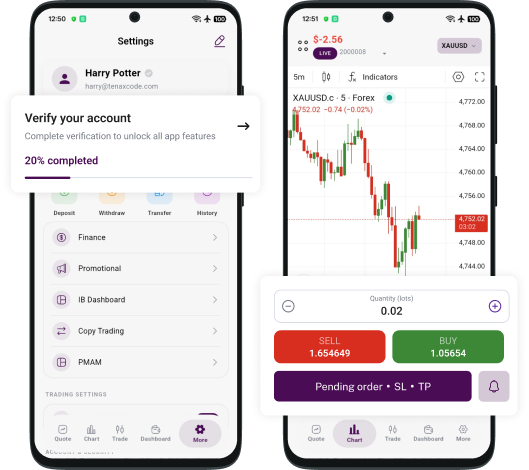
Trade anywhere with TenaxCode on Android
Stay connected to the markets with a clean mobile workspace built for execution, monitoring, and risk control.
- One-tap trade execution and order management
- Advanced charts, indicators, and price alerts
- Watchlists and favorites for faster decisions
Why trade on TenaxCode App
Trade on the move
Monitor markets and manage positions from your phone with a streamlined interface.
Charts and analysis
Use live charts, indicators, and tools that support disciplined decision-making.
Alerts and monitoring
Set alerts, track watchlists, and keep key instruments in focus throughout the day.
Secure access
Stay protected with session controls and secure login designed for account safety.
Get started in 3 steps
A simple flow for trading with TenaxCode on Android.
Download
Install the TenaxCode app from Google Play.
Login
Use your account details to access your workspace.
Trade
Track markets, place orders, and manage positions.
TenaxCode Android app guide
Explore key tools designed for an efficient mobile workflow.
Secure login
Session protection designed to support safe access.
Fast funding
Quick access to funding options where supported.
Live charts
Monitor watchlists and charts in real time.
Order controls
Tools designed to support risk management.
Frequently Asked Questions
How do I download TenaxCode on Android?
Use Google Play to download the TenaxCode Android app. If the app is not available in your region, you can use the Web Platform instead.
Can I trade and manage orders from my phone?
Yes. You can monitor markets, place trades, and manage open positions directly from the Android app.
Does the app support charts and indicators?
TenaxCode includes charting tools and indicators to support analysis and fast decision-making on mobile.
Where can I get help if I have issues?
Contact support@proprimefx.com for assistance with access, onboarding, or technical issues.